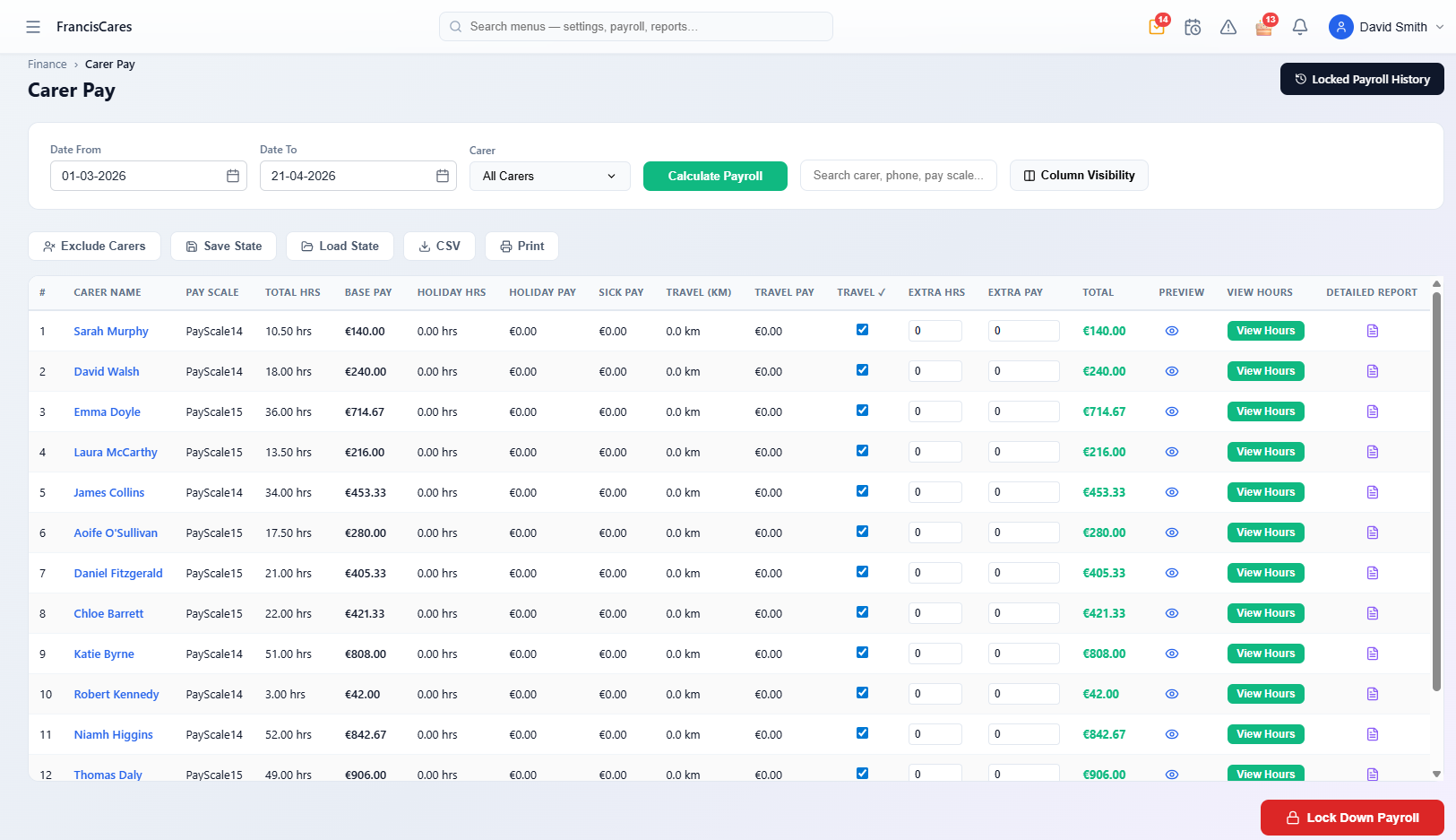
Carer Pay — GPS-validated hours, pay scales, travel, holiday and extra pay calculated per carer in one click
GPS-Validated Timesheets
Clock-in and clock-out from the CareVaultc carer mobile app feeds directly into the timesheet engine. Every visit has a verified start time, end time, and GPS location — no manual data entry, no paper timesheets, no disputes about hours worked.
The timesheet is generated automatically from confirmed visits. Office staff review and approve rather than build from scratch. This alone saves most agencies 4-6 hours per payroll cycle.
When discrepancies arise — a carer clocked in late or forgot to clock out — the system flags them for review rather than silently generating incorrect pay.
Three-Tier Pay Scale Matching
Configure separate pay pools for bank holidays, Sundays, and weekdays. CareVaultc automatically applies the correct rate based on when the visit occurred. A visit at 10am on Christmas Day gets the bank holiday rate without anyone manually flagging it.
Each carer can have their own rate card. Full-time, part-time, and bank staff often have different base rates — CareVaultc handles this without spreadsheet gymnastics.
The three-tier system is configurable. If your agency uses different rate categories (e.g. night rates, enhanced weekend rates), the pay pools adapt to your pay structure.
Date-Based Pay Scale History
When pay rates change, CareVaultc keeps a full history with effective dates. Payroll for a period that spans a rate change calculates correctly — old rate before the change date, new rate after.
This eliminates the most common payroll error in care agencies: forgetting to switch rates on the exact date they changed and overpaying or underpaying carers for a whole pay period.
Auditors and carers can both see the rate that applied to each visit, with the effective date clearly shown. Full transparency, zero ambiguity.
Expected Pay Day on Breakdowns
Every PDF pay breakdown includes the Expected Pay Day for the payroll period, so carers know exactly when to expect payment. This single field eliminates the most common query office staff receive: "when am I getting paid?"
For agencies running fortnightly or monthly payroll, the expected pay day removes confusion about which cycle a visit falls into. Carers can check their pay breakdown in the app and see the answer immediately.
PDF Pay Breakdowns
Professional PDF pay breakdowns generated in one click for each payroll period. Each breakdown is itemised by visit: client name, date, hours worked, rate applied, and total for that visit. Carers see exactly how their expected pay was calculated before the final payslip is processed through your payroll provider (e.g. Sage, Thesaurus, CollSoft).
Pay breakdowns are sent directly to the carer's mobile app. No printing, no posting, no email attachments. Carers access current and historical breakdowns from their phone at any time.
The format is clean and professional — perfect for carers who need to evidence expected income to a bank or mortgage provider.
Save & Load Payroll State
Payroll rarely gets finished in one sitting. CareVaultc lets you save your progress at any point. Come back later, or hand off to a colleague who picks up exactly where you left off.
Multiple admins can work on payroll without overwriting each other. The system tracks who made which adjustments, so there is a clear audit trail for every change.
Overtime & Mileage
Configure weekly overtime thresholds and multipliers. When a carer exceeds their contracted hours, CareVaultc automatically applies the overtime rate to additional hours. No manual calculation needed.
GPS travel distance is captured automatically between visits for mileage reimbursement. The data flows into the same pay breakdown, so carers see their mileage payment alongside their visit pay.